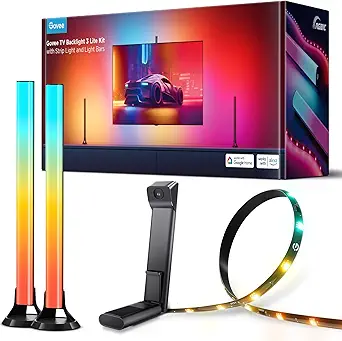
Govee TV Backlight 3 Lite (RGBICW Wi-Fi) Review
4.6 / 5
Overall Rating
Govee TV Backlight 3 Lite Kit, 11.8ft RGBICW Wi-Fi TV LED Strip Lights for 55-65in TVs with
Bias lighting that actually mirrors on-screen color is the real upgrade — and Govee's camera-based system is the cheapest way to get it.
- 11.8ft strip plus two bars for 55-65in TVs
- Syncs to both onscreen video and audio
- RGBICW 4-in-1 beads add a purer white tone
We may earn a commission if you make a purchase through our links.
Pros
- 11.8ft strip plus two bars for 55-65in TVs
- Syncs to both onscreen video and audio
- RGBICW 4-in-1 beads add a purer white tone
- Alexa, Google and app control for scenes
Cons
- Sized for 55-65 inch TVs only
- DreamView color-match relies on its camera
TL;DR
Govee's TV Backlight 3 Lite is the cheapest way to get true camera-synced bias lighting on a 55–65" TV. The included camera reads the screen edges and drives RGBICW LEDs to match — and unlike HDMI-CEC alternatives, it works with literally any source: streaming, console, cable, AppleTV, anything. At $150, it undercuts Philips Hue Sync by a wide margin and hits the visual experience that bias lighting is actually about.
Why It Matters
Bias lighting reduces eye strain, increases perceived contrast, and makes a dark-room TV setup feel more cinematic. Synced bias lighting takes that further by extending on-screen color into your room. The original way to do this — Philips Hue Sync Box — requires HDMI passthrough and costs $350+. Govee's camera approach skips the HDMI box entirely, which is the breakthrough.
Key Specs
- TV size: 55–65 inches
- Strip length: 11.8 ft RGBICW
- Sensor: included clip-on camera (auto-calibration)
- Connectivity: Wi-Fi, Govee app, Alexa & Google Home
- Power: USB-A
- Effects: 60+ scenes, music sync, video sync
Pros
- True video sync via camera works with any HDMI source
- RGBICW (white channel separate) gives accurate whites, not muddy pink
- Setup is genuinely 15 minutes start to finish
- Strip is bright enough to be visible with room lights on
- App stability is much improved over earlier Govee gen
Cons
- Camera placement requires good central sight-line; corner-mounted TVs struggle
- Bright ambient light in the room throws color sampling off
- Adhesive strip is one-shot — don't waste a peel
- Wi-Fi is required for video sync (Bluetooth-only fallback skips that feature)
- 65" is the upper limit; 75"+ TVs need the bigger Pro version
Who It's For
Gamers who want screen-matched ambient color, movie watchers in dim rooms, and anyone whose 55–65" TV currently sits against a bare wall. Skip it if you have a 75"+ panel (get the Pro), if your TV is in a brightly lit room, or if you need HDMI 2.1 passthrough sync (get a Hue Sync Box).
How to Use It
Clean the TV bezel with isopropyl alcohol before sticking the strip — that's the difference between a clean install and a sagging mess. Mount the camera centrally above or below the screen, with line of sight to all four corners. Run the in-app calibration in a dim room. Update the firmware before first use.
How It Compares
Vs. Philips Hue Sync Box: Hue's HDMI passthrough is more accurate at high frame rates but costs more than 2x and limits HDMI inputs. Vs. Nanoleaf 4D: similar camera-based approach, slightly snappier scene sync, $50 more. Vs. cheap Govee non-camera strips: those just play scene patterns; only the camera kits sync to actual content.
Bottom Line
The best $150 home-theater upgrade for a 55–65" TV. Buy it if you watch movies or play games in a dim room. Skip it if your TV competes with daylight or if you need HDMI passthrough.
Streaming Service Cost Optimizer
Google Sheet template that calculates your true cost-per-hour watched across Netflix, Hulu, HBO Max, Disney+, and more. Find which services are actually worth keeping.
Average user saves 23 dollars per month
Instant download. No spam. Unsubscribe anytime.
Affiliate Disclosure
Discussion
Sign in with GitHub to leave a comment. Your replies are stored on this site's public discussion board.